搜尋此網誌

2010年4月7日 星期三

Returning values by value, reference, and address

Return by value


Return by value is the simplest and safest return type to use. When a value is returned by value, a copy of that value is returned to the caller. As with pass by value, you can return by value literals (eg. 5), variables (eg. x), or expressions (eg. x+1), which makes return by value very flexible.


Another advantage of return by value is that you can return variables (or expressions) that involve local variables declared within the function. Because the variables are evaluated before the function goes out of scope, and a copy of the value is returned to the caller, there are no problems when the variable goes out of scope at the end of the function.


1.int DoubleValue(int nX)
2.{
3.    int nValue = nX * 2;
4.    return nValue; // A copy of nValue will be returned here
5.} // nValue goes out of scope here


Return by value is the most appropriate when returning variables that were declared inside the function, or for returning function arguments that were passed by value. However, like pass by value, return by value is slow for structs and large classes.


Return by reference


Just like with pass by reference, values returned by reference must be variables (you can not return a reference to a literal or an expression). When a variable is returned by reference, a reference to the variable is passed back to the caller. The caller can then use this reference to continue modifying the variable, which can be useful at times. Return by reference is also fast, which can be useful when returning structs and classes.


However, returning by reference has one additional downside that pass by reference doesn’t — you can not return local variables to the function by reference. Consider the following example:


1.int& DoubleValue(int nX)
2.{
3.    int nValue = nX * 2;
4.    return nValue; // return a reference to nValue here
5.} // nValue goes out of scope here


See the problem here? The function is trying to return a reference to a value that is going to go out of scope when the function returns. This would mean the caller receives a reference to garbage. Fortunately, your compiler will give you an error if you try to do this.


Return by reference is typically used to return arguments passed by reference to the function back to the caller. In the following example, we return (by reference) an element of an array that was passed to our function by reference:


01.// This struct holds an array of 25 integers
02.struct FixedArray25
03.{
04.    int anValue[25];
05.};
06. 
07.// Returns a reference to the nIndex element of rArray
08.int& Value(FixedArray25 &rArray, int nIndex)
09.{
10.    return rArray.anValue[nIndex];
11.}
12. 
13.int main()
14.{
15.    FixedArray25 sMyArray;
16. 
17.    // Set the 10th element of sMyArray to the value 5
18.    Value(sMyArray, 10) = 5;
19. 
20.    cout << sMyArray.anValue[10] << endl;
21.    return 0;
22.}


This prints:


5

When we call Value(sMyArray, 10), Value() returns a reference to the 10th element of the array inside sMyArray. main() then uses this reference to assign that element the value 5.


Although this is somewhat of a contrived example (because you could access sMyArray.anValue directly), once you learn about classes you will find a lot more uses for returning values by reference.


Return by address


Returning by address involves returning the address of a variable to the caller. Just like pass by address, return by address can only return the address of a variable, not a literal or an expression. Like return by reference, return by address is fast. However, as with return by reference, return by address can not return local variables:


1.int* DoubleValue(int nX)
2.{
3.    int nValue = nX * 2;
4.    return &nValue; // return nValue by address here
5.} // nValue goes out of scope here


As you can see here, nValue goes out of scope just after its address is returned to the caller. The end result is that the caller ends up with the address of non-allocated memory, which will cause lots of problems if used. This is one of the most common programming mistakes that new programmers make. Many newer compilers will give a warning (not an error) if the programmer tries to return a local variable by address — however, there are quite a few ways to trick the compiler into letting you do something illegal without generating a warning, so the burden is on the programmer to ensure the address they are returning will be to a valid variable after the function returns.


Return by address is often used to return newly allocated memory to the caller:


01.int* AllocateArray(int nSize)
02.{
03.    return new int[nSize];
04.}
05. 
06.int main()
07.{
08.    int *pnArray = AllocateArray(25);
09.    // do stuff with pnArray
10. 
11.    delete[] pnArray;
12.    return 0;
13.}


Conclusion


Most of the time, return by value will be sufficient for your needs. It’s also the most flexible and safest way to return information to the caller. However, return by reference or address can also be useful, particularly when working with dynamically allocated classes or structs. When using return by reference or address, make sure you are not returning a reference to, or the address of, a variable that will go out of scope when the function returns!


摘自: http://www.learncpp.com/cpp-tutorial/74a-returning-values-by-value-reference-and-address

2010年3月5日 星期五

What is heap and stack?

What is heap and stack?

The stack is a place in the computer memory where all the variables that are declared and initialized before runtime are stored. The heap is the section of computer memory where all the variables created or initialized at runtime are stored.

What are the memory segments?

The distinction between stack and heap relates to programming. When you look at your computer memory, it is organized into three segments:

  • text (code) segment
  • stack segment
  • heap segment

The text segment (often called code segment) is where the compiled code of the program itself resides. When you open some EXE file in Notepad, you can see that it includes a lot of "Gibberish" language, something that is not readable to human. It is the machine code, the computer representation of the program instructions. This includes all user defined as well as system functions.

Heap and stack - what is it?

Now let's get to some details.

What is stack?

The two sections other from the code segment in the memory are used for data. The stack is the section of memory that is allocated for automatic variables within functions.

Data is stored in stack using the Last In First Out (LIFO) method. This means that storage in the memory is allocated and deallocated at only one end of the memory called the top of the stack. Stack is a section of memory and its associated registers that is used for temporary storage of information in which the most recently stored item is the first to be retrieved.

What is heap?

On the other hand, heap is an area of memory used for dynamic memory allocation. Blocks of memory are allocated and freed in this case in an arbitrary order. The pattern of allocation and size of blocks is not known until run time. Heap is usually being used by a program for many different purposes.

The stack is much faster than the heap but also smaller and more expensive.

Heap and stack from programming perspective

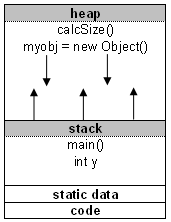
Most object-oriented languages have some defined structure, and some come with so-called main() function. When a program begins running, the system calls the function main() which marks the entry point of the program. For example every C, C++, or C# program must have one function named main(). No other function in the program can be called main(). Before we start explaining, let's take a look at the following example:

int x;                           /* static stack storage */
void main() {
int y; /* dynamic stack storage */
char str; /* dynamic stack storage */
str = malloc(50); /* allocates 50 bytes of dynamic heap storage */
size = calcSize(10); /* dynamic heap storage */

When a program begins executing in the main() function, all variables declared within main() will be stored on the stack.

If the main() function calls another function in the program, for example calcSize(), additional storage will be allocated for the variables in calcSize(). This storage will be allocated in the heap memory segment.

Notice that the parameters passed by main() to calcSize() are also stored on the stack. If the calcSize() function calls to any additional functions, more space would be allocated at the heap again.

When the calcSize() function returns the value, the space for its local variables at heap is then deallocated and heap clears to be available for other functions.

The memory allocated in the heap area is used and reused during program execution.

It should be noted that memory allocated in heap will contain garbage values left over from previous usage.

Memory space for objects is always allocated in heap. Objects are placed on the heap.

Built-in datatypes like int, double, float and parameters to methods are allocated on the stack.

Even though objects are held on heap, references to them are also variables and they are placed on stack.

The stack segment provides more stable storage of data for a program. The memory allocated in the stack remains in existence for the duration of a program. This is good for global and static variables. Therefore, global variables and static variables are allocated on the stack.

Why is stack and heap important?

When a program is loaded into memory, it takes some memory management to organize the process. If memory management was not present in your computer memory, programs would clash with each other leaving the computer non-functional.

Heap and stack in Java

When you create an object using the new operator, for example myobj = new Object();, it allocates memory for the myobj object on the heap. The stack memory space is used when you declare automatic variables.

Note, when you do a string initialization, for example String myString;, it is a reference to an object so it will be created using new and hence it will be placed on the heap.

摘自: http://www.maxi-pedia.com/what+is+heap+and+stack

2010年1月17日 星期日

真是至理名言阿...

時間,就像乳溝一樣,擠一擠就有了!

機會,就像老二一樣,緊握就會變大!

生活就像是被強姦,反抗不了就學著享受!

學習就像嫖妓,出錢又出力!

工作就像輪姦,如果你不行,就換另一個人來做!

社會就像手淫,全部的事情都要靠自己的雙手去解決!

發薪水就像是月經,一個月不來那麼一次總覺得不能安心!

兄弟就像保險套,插多大的洞都幫你罩著!

就算要fuck,起初也要有fu!

就算是lover,最後還是有個over!

就算是Believe,中間還是有個lie!

承諾,就像一句幹你娘,人人都會說,卻沒人做得到!

2009年12月26日 星期六

自來水博物館遊記

自從到了台灣大學創新育成中心工作之後,每天看到的風景就是自來水博物館
說實話,自來水博物館裡面真的是甚麼都沒有..有的就是那棟巴洛克風的建築.
不過不可諱言的,那棟建築物在黃昏及夜晚真的很美.
從建築物窗戶透出昏黃的燈光,在外面以略強的燈光直打外牆,配合巴洛克的風格,根本就是絕配.
只是我想不懂的是..為何大家都是白天來這裡拍婚紗...真是浪費此處的美景.

2009年11月6日 星期五

如何執行外部程式,並取得其標準輸出資料

在Qt中,要執行外部程式最容易的方法就是使用 QProcess, 並連結 readyReadStandardOutput 這個signal來取得其標準輸出.

例如,我們要在程式內部執行 ls 這個命令,並取得其結果,我們可以這麼做

// header file ----------

QProcess pls;

// cpp ------------------

connect(&pls, SIGNAL(readyReadStandardOutput()), this, SLOT(sl_readPlsOutput()));

pls.start("ls", QStringList() << "-al");

if (!pls.waitForStarted())
printf("wait for pls\n");
if (!pls.waitForFinished())
printf("wait for pls\n");

// slot -------------------
sl_readPlsOutput()
{
QByteArray tmpArray;
tmpArray = pls.readAllStandardOutput();
}

2009年10月20日 星期二

如何利用QT來取得系統設定

在Linux的環境中,大部分的設定都是標準的文字檔,那要如何取得那些設定的資料呢?
如果我們是用QT開發的話,可以用以下的方式
1. 利用QFile以文字檔的方式開啟設定檔
2. 將設定檔中的資料一行一行的讀出

範例1: 判斷系統是否存在特定型號的DVD
bool isFindDVD()
{
QFile procDVD("/proc/scsi/sg/device_strs");
if (!procDVD.open(QIODevice::ReadOnly | QIODevice::Text))
return false;

QString line;
while(1) {
line = QString(procDVD.readLine());
if (line.isEmpty()) break;
eprintf("isFindDVD = %s\n", qPrintable(line));
if ((line.contains("ATAPI")) && (line.contains("DVD"))) {
return true;
}
}
return false;
}

範例2: 取得 CPU的型號
QString cpuModel()
{
QFile procCPU("/proc/cpuinfo");
if (!procCPU.open(QIODevice::ReadOnly | QIODevice::Text))
return "";

QString line;
while (1) {
line = QString(procCPU.readLine());
if (line.isEmpty()) break;
if (line.contains("model name")) {
return line;
}
}
return "";
}

2009年10月9日 星期五

Function template

Function template 是一種可以依傳入型別的不同,自動產生特定函事實體的方法
Function template最簡單的的定義方法如下:

template
MyType min (MyType a, MyType b) {
return (a < b) ? a : b;
}
其中 < class MyType >, 代表是 template 的參數列, 意即 MyType的型別是可經由傳入的參數改變其型別.
例如, 我們如下的方式呼叫
min(10, 100); // int, int
則產生的函式實體為
int min (int a, int b) {
return (a < b) ? a : b;
}
因為,傳入的參數型態為整數,所以 MyType 的型態就變成了 int.
假設我們呼叫的方式為
min(10.0, 100.0); //double, double
則產生的函式實體為
double min (double a, double b) {
return (a < b) ? a : b;
}
當然, 參數列的參數,不以一個為限,它可以有多個參數
如:
template
Type1 findMax(Type1 a, Type2 b)
{
return ( a > b) ? a : b;
}
假設我們呼叫的方式為
findMax(10, 100.0); // int, double
則產生的函式實體為
int findMax(int a, double b) {
return ( a > b) ? a : b;
}
其中 Type1被 int取代,而 Type2 被double取代.

--------------------------------------------------
然而參數列的參數,不僅僅是要型別參數,也可以是非型別參數,所謂的非型別參數所代表的即為一個數值,這個數值在template的定義式中式一個常數
如:
template
Type min(Type (&arr) [size]) {
………
}
其中的 int size 即為非型別參數
假設我們已如下的方法呼叫
Int i;
int ia[] = {1, 2, 3};
i = min(ia);
則產生的函式實體為
int min(int (&arr) [3]) {
………
}
其中 Type被 int取代, 而 size 被3取代 (因為 ia這個這個陣列有三個元素).